Unfortunately not, I didn't mean to mislead you!
The name is not great and I do want to change it eventually. The thought process was something like night and day, Playnite and Playday, and play dates are a thing so it just kind of stuck.
Also I added a giveaway to the thread, 0 CV game but I enjoyed it
Comment has been collapsed.
It was a joke (although i think it would be a fun idea to have an app to meet fellow gamers for game dates).
Your name is actually a good one.
Comment has been collapsed.
RIP Lugum, you would have loved my reddit ads (for the curious, I think the dating app was called Boo)
Comment has been collapsed.
for the curious, yes, it's called boo and it's total dogshit 0/1 not recommended
Comment has been collapsed.
I just assumed that the male to female ratio would be especially atrocious and looked like the type of place that would be mostly dragged by bots. What made your experience crap?
Comment has been collapsed.
The Dev for Playnite is moving to Linux, so Playnite may be available on Linux soon.
Comment has been collapsed.
I know a Linux port is in the works but I heard it will be a while before the Linux version catches up to the features that the Windows version has, especially with plugins. PlayDate was built to be cross platform including Mac (though I haven't been able to test if it works) and it has BLAEO and PAGYWOSG features built in.
Linux version of Playnite was planned before I started my project but if I didn't make my own I would still be waiting.
Comment has been collapsed.
Name is taken already: https://en.wikipedia.org/wiki/Playdate_(console)
Comment has been collapsed.
Another reason why I want a new name, just haven't come up with a better one yet. I might rename it to Hoard but I am open to other suggestions
Comment has been collapsed.
Been thinking a bit on this and how about Steam Cross Platform Environment? You could shorten it as S-CPE and read it like Escape as a nod to the fact that it is platform agnostic!
Comment has been collapsed.
I knew it was familiar, just couldn't remember from where. Thank you for sharing! Haha
Comment has been collapsed.
Kudos!
I like the name but if you want to change it, you can go many ways. Even keeping the "play" thing (Plaything obviously wouldn't work 😅) like Playground or Playtime
Comment has been collapsed.
I tried out. It is pretty, but please change the default installation folder to Program Files or anything other than AppData on Windows. I got an error if I wanted to install there. Also, consider adding HLTB times and sync option with the Steam app. I mostly use the Steam app to sort my 4k+ games, and starting from zero with a new program is futile.
For name: Steam Playtime Manager or Steam Game Manager. It is simple and easy to understand
Comment has been collapsed.
Default install folder will be changed in the next update, it won't affect existing installs.
HLTB sync is a planned feature but they don't use AppID so will have to find matches by game name which gets messy. Some things are not exact matches but very close, like Overwatch® vs Overwatch, some are a little tricky like Marvel's Avengers- The Definitive Edition vs Marvel's Avengers, and I imagine some will need to be done manually or just skipped.
When launching PlayDate it starts updating your library automatically. It does take a while to fully load a large library like you or I have, and I will look into speeding up that process! It's always going to take time to fully populate large libraries but maybe the metadata can be done later or something else can be changed to save time getting started.
Thanks for the feedback!
Comment has been collapsed.
Maybe this helps for hltb https://github.com/julianxhokaxhiu/Depressurizer
Comment has been collapsed.
Can't get it to populate games. Win10, checked several times api keys, restarted, checked firewall and other win settings... Restarted app and pc, nothing helps... Nothing written in playdate.log either...
But like the idea and what i see in screenshots :)
edit: so little update while i try to figure things out... win10 64x, i have Microsoft Edge WebView2 Runtime running, checked firewall and security if they are blocking app and they are not, currently updating latest win10 things but it already hit the end as far as i know... made sure edge is updated too, since it can cause WebView2 to not be current etc...still not populating...
Comment has been collapsed.
Sorry it's not working! I'll look into what might be going wrong I will add additional logging that would hopefully point us in the right direction
Comment has been collapsed.
No need to be sorry :)
I have fully updated win10, no more updates. I have tried as administrator, not sure what else to try :)
An idea, add button to check api keys if they are working from setting. So people can easily check if they have right key, since sometimes copy/paste can add extra space etc.
Also checked your showcase now completely, like what i see with PAGYWOSG Filter. Is there a way to export and import filter settings for each month? So only one person makes the filter and rest just use it :D
Edit: I have tried populating things without api key and after few seconds it just says "X Falied" and when i try it with API key it doesn't say anything. Reinstalled it few times with different install folders(just in case)... Still not populating... Tried with several account just in case, nope, nada...
Comment has been collapsed.
Seems like there was an issue with the logs on Windows but I uploaded a new version that should hopefully fix that. Not sure what would be the best way to send me the log file...
New version also updated the default install location in case other users run into the same issue as hallak. Also fixed a gamepad issue so PlayDate no longer receives inputs while in the background.
Edit: forgot to respond to your other queries. API keys are checked when they are input during initial config, if it doesn't work you should see "Invalid API Key (403 Forbidden)". And I thought I implemented importing/exporting filters but apparently I forgot, I'll add that soon.
Comment has been collapsed.
Thanks for fixing things up :)
Also suggestion, make you link point to main page or release page, not 1.2.1 version.
Comment has been collapsed.
Bump for a very cool project!
From a noob perspective, I can say that BLAEO and PAGY's integrations are a bit difficult to find. Maybe I'm too dumb, but I didn't know how to sync my BLAEO account until after I had manually added all my wins and gifted games to their respective groups. Maybe moving it or copying it to the account section could be a solution!
Overall it's a very useful tool, thank you for taking the time!
Comment has been collapsed.
Thanks for the feedback! I'll look into making some sort of quick tutorial soon. Currently working on speeding up the library populating as much as I can
Comment has been collapsed.
Version 1.2.2 fixed logging on Windows and a bug with gamepad controls being read even when PlayDate is in the background
Version 1.2.3 fixed database populating failure when dealing with non-ASCII characters and fullscreen state not being saved when closing the program
Version 1.2.4 overhauled the database populating with placeholder game cards, multitasking, and prioritizing visible game cards. Improves overall speed a bit but images and most metadata will be scraped much faster.
Comment has been collapsed.
Trying this out. Any way to auto-mark games with 100% achievement rate as completed?
Comment has been collapsed.
Games should get auto sorted into never played (playtime = 0), unfinished (playtime > 0 AND not 100% achievements), and completed (100% achievements). Did this not work for you?
Comment has been collapsed.
It didn't at the time but I'll check again tomorrow. Maybe I goofed something up somehow.
Comment has been collapsed.
API key or BLAEO profile is needed for achievements data. I will make that more clear, my bad!
(If you did use an API key and/or if you do have a BLAEO profile then there is another issue and I will need to do some digging to figure it out)
Comment has been collapsed.
I immediately did API and BLAEO when I set it up. It seems to return a blank on the 100% achievement games instead of returning "completed" in the "completion status" field, so I keep having to manually mark them.
Comment has been collapsed.
i think i found a fix for the next update but if you don't want to wait you could do it like this:
Library page, filters, advanced mode. +condition, unlocked achievements more than 0, +expression, unlocked achievements exactly total achievements (there's a little button that switches from comparing against a value like 0 to comparing against a column like total achievements)
Then use the Bulk Edit button in the Library page to set all those games Completion Status to Completed


Comment has been collapsed.
I'll wait since I marked this month's group already but I appreciate the workaround and upcoming fix!
Comment has been collapsed.
The lack of a Linux version of Playnite is the main thing keeping me from switching away from Windows. But I use Playnite primarily to combine my game libraries from Steam, Epic, GOG, Itch.io, EA & Ubisoft into one database. It helps stop me buying games that I already own elsewhere and allows me to view and launch the games from a single application.
Do you have plans to support the import of non-Steam game libraries?
Comment has been collapsed.
Yes, the biggest things on my to-do list are HLTB support, non-Steam library support, and a plug-in system. I do miss the non-Steam library support but also I mostly just filtered my library to only show Steam games anyways. And with other libraries I would want some sort of duplicate hider. Basically yes it has been a planned feature from the beginning but the complexity and scale of that made me avoid it thus far.
Comment has been collapsed.
Sounds good, and yes it would definitely need a way to hide duplicates. I use DuplicateHider in Playnite to accomplish that. In fact the only plugins I use in Playnite are DuplicateHider, HowLongToBeat and Library Exporter Advanced (to export my list of games to a spreadsheet).
The other thing I'd like to achieve in Playnite (which may exist already, I haven't looked into it yet) is a way to show an indication of completion status in the library grid view. I'm not sure how this would work but something similar to the rosette you see in Steam here for perfect games. Maybe it would be a gold rosette if you have either got 100% achievements or set the game as complete (for games without achievements), then a silver rosette for 75%-99% achievements, and bronze for 50%-70%. Something like that would be a nice quick indicator to see which games I need to go back and complete.
Comment has been collapsed.
not a bad idea to add something like that. maybe i will allow game cards to show a custom icon for games in a group, then the user can create the groups they want and choose their own icons. for now if you want to find games like what you mentioned you can do something like what's in the attached image below. next update will make it better so you can just do "unlocked_achievements / total_achievements > 0.75" etc.
Comment has been collapsed.
I have not yet made the overlay badges but newest version does add GOG support and duplicate hiding. I tried doing GOG, EGS, EA, and Ubisoft all at once but that was a mistake. I also added HLTB stuff recently, and Export to CSV tool has been there for a long time. Do you think a simple CSV exporter is good enough? And if not, which advanced features would you like it to have?
Comment has been collapsed.
Oh that's great, nice work. And yes, a simple CSV exporter is basically all I use with Playnite at the moment. The columns I export are Game name, Store (Steam, GOG, etc), Store page link, Play count and Play time. The first two are the most important, store link is useful and the last two I just add because I can. I would also add achievement progress or completion state if it was a possibility.
Comment has been collapsed.
Only thing PlayDate doesn't have for you is Play Count, do you know if it's tracked by Steam or Playnite? It could be added either way. Only problem with CSV export is that every column is included, which would mean a lot of stuff that you wouldn't find useful. I can add the ability to choose which columns are exported, that probably should've already been included. In my defense there were far fewer columns when that feature was added lol
Comment has been collapsed.
Looking at my spreadsheet, it must be Playnite that tracks Play Count because I can see games that I played before I started using Playnite and they have a play time but not a play count. In fact I'll probably delete that column as I don't find it useful really - play time is more useful.
And yes, it would be great to be able to limit the output to only selected columns. Not essential, but it would save some time cleaning it up later.
Comment has been collapsed.
I'm curious, how do you plan to integrate the libraries for the stores that don't provide a native Linux client? Will you do so through another third party client like Heroic Games Launcher?
Comment has been collapsed.
I haven't thought about that, but it's probably smarter to do that rather than trying to reinvent the wheel. I had issues trying to use Heroic so I might not be able to properly test that myself. Not sure if it was an issue for just me or what, honestly I don't even remember what the problem was.
Comment has been collapsed.
I have used Heroic a bit and while it's not as smooth of an experience as Steam I actually found it better than the official Epic client, it's closer on features to GOG Galaxy but a bit more stable, one annoyance for me was that while it does a good job of handling Wine and Proton it has nothing for controller compatibility and instead relies on Steam for it, it's rather shocking just how many games and game-related software actually relies on Steam input for basic compatibility on Linux.
There's a rumor that GOG might un-cancel their Linux port of Galaxy at some point and get serious again about Linux support in general but so far it's only been a vague statement of intent by the new leadership after the restructuring from last year.
Comment has been collapsed.
Heroic seems to be fine actually, maybe it was Lutris that was giving me problems. Either way non-Steam libraries will not be available for a bit, it's gonna take a lot of work. Maybe a quick fix would be to allow non-Steam games to be imported from Playnite backups and/or some sort of manual Add Game functionality.
Comment has been collapsed.
I did try using Lutris to get all the stores working but it didn't work out. I managed to eventually get GOG library integrated with API calls in the newest release but I am sure the others will be even trickier.
Comment has been collapsed.
I imagine it's quite the task to get all of that stuff integrated and working properly, so kudos for getting one up and running!
Haven't tried this program yet as I haven't been using my Linux machine this month, I've basically been doing everything on my laptop and it's still running W10, but I'll try to remember to give your program a go when I get my desktop sorted (that whole room is a mess currently).
Comment has been collapsed.
It is available for Windows, Mac and Linux, so you can try on your Windows PC if you want. But no problem if you'd rather wait until you are back on Linux, the longer you wait the more features and fixes it'll have (and a better first impression can't hurt lol)
Comment has been collapsed.
Version 1.2.5 has improvements to the included tamper monkey script for getting game activation dates for the Date Added field, using drop down lists and "pills" for the bulk editor, and fixed arithmetic expressions with integers in the filters (previously integers divided by integers would only give integer results)
Comment has been collapsed.
Version 1.2.6 fixed the sides of large game cards on the Library page being cut off by padding, slight change in filter UI, fixed edge case where games with 100% achievements are not marked as Completed, and overhauled the Tampermonkey script for getting the date you added a game to your Steam library instead of the date the game was added to PlayDate.
And yes, there is (and has been) a tampermonkey script available in the project files but it kinda sucked so I didn't want to mention it. It used to require an older version of Tampermonkey to run, now it runs on the current version. It used to open each game's help page visibly, now that data is gathered in the background while giving progress updates. Could still be improved but now it is not just functional but also presentable.
Comment has been collapsed.
1.2.7 added PAGYWOSG filter builder auto-fill which includes AppIDs for non-metadata games that have already been verified as well as icaio's wishlisted / giveaway games when applicable. When a PAGYWOSG filter is active, open a game's edit panel will show which categories the game qualifies for. Also minor UI changes.
1.2.8 added ProtonDB scraping / filters, Bulk Edit panel split into tabs, live updates for installed status changes, performance fix for filters with "Any game icaio has made a GA for" (5106 AppIDs were being loaded every time), plus a few other changes and fixes
I have been putting off HLTB integration and non-Steam library support but I will work on them soon. HLTB will probably be done this week. I will definitely attempt non-Steam library support but I have no idea if it will go well.
Comment has been collapsed.
I like what you did with populating data and images. Also like the auto PAGYWOSG filters. Nice :)
But I noticed a bug with PAGYWOSG filters, since my SG wins list is called "SG wins" and not "Won on SteamGifts", it doesn't find it as the default when applying filters. Maybe add an option when syncing BLAEO for users to choose their SG wins default list, so things aren't hardcoded.
A few suggestions as well:
When a PAGYWOSG filter is active in the library, it would be great to have a tooltip on each game card showing which PAGYWOSG categories that game qualifies for, so you don't have to click every single entry to check. If possible, it would be great to include the HLTB time in that tooltip as well. so you can see both the qualifying categories and the estimated playtime at a glance, which makes it much easier to decide what to play next. :D
Comment has been collapsed.
I have an idea for the won on SG games, will probably implement it into the PAGYWOSG Filter Builder rather than the BLAEO Sync. But for the PAGYWOSG qualifications and HLTB time, are you suggesting show that when hovering over a game or just overlay it on top of all the images at all times when the filter is active?
Comment has been collapsed.
Well i think it might look better while hovering, so you can see the game image at all times :)
Comment has been collapsed.
Both implemented in 1.3.1 thank you for the suggestions! I like adding new functionality.
I'm surprised people haven't complained about the UI, I want people to suggest improvements because I know a lot of things could be presented better.
Anyways with HLTB done the next big thing is non-Steam library integration. Will probably rely on Lutris for Linux. Windows and Mac will be more difficult. Will tackle some of the smaller stuff first, like a "group by" feature, list/details mode, improvements to the smart game pickers, improvements to gamepad controls, any bugs that are reported (or noticed by me) and more. I'll likely start the non-Steam library stuff next weekend.
Comment has been collapsed.
Ok thought of something.
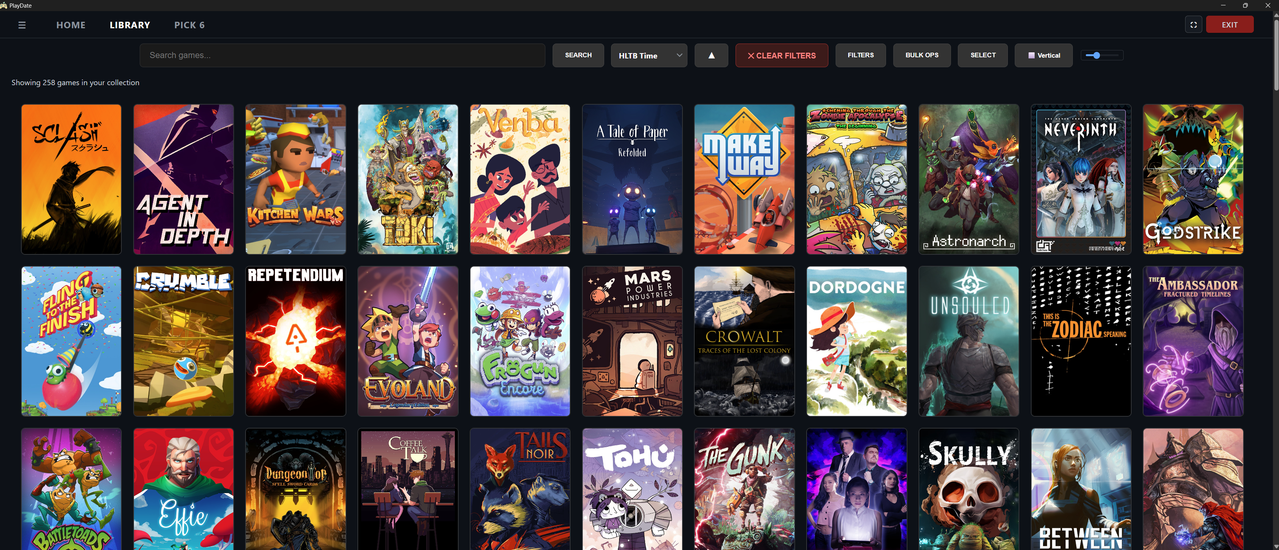
I was navigating on the Library view with my PAGY filters set, but I blanked out and could not get started browsing through my titles. Playnite has a feature that helps me with that kind of indecision - the "Pick a Random Game" (from the current view) button. Something like that would be cool here
I think Playnite's implementation is a dice button. I would like to have it on the top row -- either before the search bar, or after the cover size slider
Comment has been collapsed.
I like the idea of making this shortcut. Currently we do have the Pick 6 page which can pick games from your currently active filter, with three different modes. One thing I did temporarily on my setup was edit the home page's Shuffle shelf to use this month's PAGYWOSG filter, then clicking on the shelf title (Shuffle) is another way to get a new batch of random PAGYWOSG games.
Comment has been collapsed.
Yup, I've played around with the Pick 6 among my filtered view. Personally, the Smart option is my preferred, the Weighted is powerful but I'm too lazy to play with the sliders.
That said, there's something about clicking on the random pick button and being taken somewhere on my current view that has a different appeal than just seeing the six materialize out of thin air. Maybe it's seeing all the game covers around the one that was picked, and thinking about when I'll play them. I don't know. Hahahaha my brain is a mess
Comment has been collapsed.
Version 1.3.0 added HLTB support, game names matching under 99% confidence need to be manually confirmed, 99% threshold can be changed. Unconfirmed HLTB matches can be found and confirmed in the Tools menu.
Version 1.3.1 added a PAGYWOSG tooltip when hovering over games while PAGYWOSG filter is active and support for different names for Won on SteamGifts group in PAGYWOSG Filter Builder
Version 1.4.0 added GOG library integration, installing & launching GOG games, hiding of duplicates (GOG version of games are hidden when also owned on Steam), background image opacity slider, and editing PAGYWOSG filters no longer disables the category tooltip and edit modal info. Tampermonkey script for getting purchase/activation dates (stored in Date Added, which initially uses date that the game was added into your PlayDate database) has been updated to get GOG activation dates as well.
All of these updates include smaller changes and fixes that you probably don't need to know about.
What library integration should I work on next? Epic Games Store, EA App, Ubisoft Connect, DRM-free games, or Emulators / ROMs?
Edit: In case anybody is wondering, sorting by HLTB is a bit different than others. Because there are up to 3 different times for each game, we use the smallest of the 3 times when sorting by HLTB Ascending and the largest of the 3 times when sorting by HLTB Descending. I figure most people using HLTB sorting are looking for the shortest or longest games.
Comment has been collapsed.
I like being able to configure the order of Duplicate Hiding. Steam > GOG is a good default, but some people might prefer otherwise so it's always good to have this as an option.
Personally, Steam covers 60% of my gaming, GOG and Epic covers 15-20% each, and itch covers the rest. EA, Ubisoft, Rockstar, Legacy, these are mostly distractions rather than proper use cases for me, and I could live without those, but not without the former four. Emulators could be cool, but I personally don't play them a lot so I wouldn't make it a priority. Congrats on the progress!
Comment has been collapsed.
The plan is to have a list of available platforms that the user can reorder, but I figured that for now, with only one extra platform currently implemented, it's easier to just make Steam the priority and a simple toggle for showing/hiding the duplicates. I never really even considered itch.io integration but I'll add it to the list.
Dice button is a good idea too, will probably implement it by picking a random game, scrolling to it, and highlighting it. Maybe not a top priority because such similar functionality is already there but sometimes I'm just looking for something quick and easy to add. Would Pick 6 smart/weighted modes be better if they explained why each game was picked? Or is 6 games not enough?
Comment has been collapsed.
Thank you for your consideration on both points.
Weighted might be improved with more explaining. I tried using it a bit and I didn't feel like my selections were actually leading the picked games to things I expected, hence why I dropped it a little bit. Smart is actually .... really good as it stands. It doesn't explains anything, but intuitively it feels smart, which I guess is the whole purpose to it. I don't think it needs tweaking, personally. I really like it. I just don't use it when I want to browse my library (which I do often), but probably would be one way I would pick my PAGY games at the beginning of the month since it shows a good selection without overwhelming me
Comment has been collapsed.
Forgot to mention - itch had this massive bundle in 2020 that had, I don't know, 2000 games? Many of those are actually super decent. That's how I played Celeste, to mention one. For many people, that bundle alone would make it worth their time. itch is also super nice for people going more into indie titles and solo dev stuff. Anyway, you're already considering it but I wanted to add some texture to my comment :)
Comment has been collapsed.
Dice button and Pick 6 explanations have been added
Comment has been collapsed.
Neat! Thank you for that. I really like the dice. Personally, whenever I "dice" after a random game, I tend to "dice" more than once so it would be nice to have the option of having the top bar (in Library View) sticky. Otherwise, when I press the Dice button, I'm forced to scroll all the way back to press it again.
The explanations for Pick 6 are flawless. Combining the Library View filters with Pick 6 is a fantastic way to combat choice paralysis, I'll definitely use it next month for PAGY. Thank you thank you!!
Comment has been collapsed.
Search bar should be sticky, 100% agree. Thanks for the suggestions, keep them coming if you have / come up with any more! Especially UI things, I find it tough to make those types of decisions.
Comment has been collapsed.
Thanks for the app, RobbyRatpoison, it’s very useful.
I have one small suggestion: when selecting a tag value in the filter, the option list can be quite long. On the website, typing a key jumps to options starting with that letter, but this doesn’t seem to work in the app. Adding this feature would make navigation much more convenient.
Comment has been collapsed.
1.4.1 added UI scaling, random game picker on library page, min/max bounds for Pick 6 factors, ability to cancel GOG downloads, and CSV column selector. BLAEO Sync no longer downgrades completion status. GOG game installation status updates automatically. Completion Chart widget stays circular with various shelf widths. Searching while PAGYWOSG filters are active preserves PAGYWOSG qualifications. Pick 6 games come with explanations. Pick 6 weighted mode sliders can be collapsed to make more room for game cards. Library page Select mode moved into Bulk Ops panel. Show/hide dupes moved into settings.
1.4.2 consolidated library page view options (sort-by, sort order, grid orientation, grid size, platform visibility, and group-by) into a new View panel, added a new Group By option with collapsible groupings, added drop down list searching for tags and others, added searching in large drop down lists, and fixed Release Date sometimes not matching what the Steam store shows (plus a one time migration to fix previously fetched dates).
Comment has been collapsed.
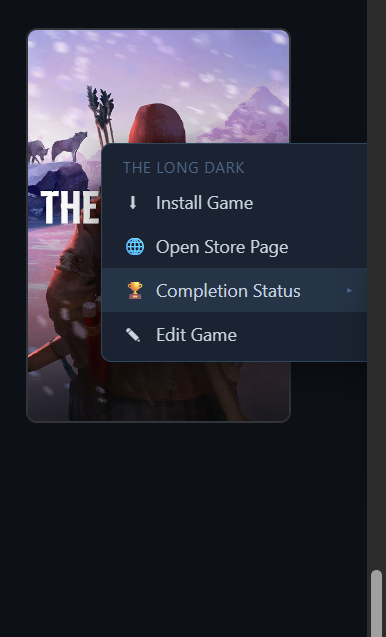
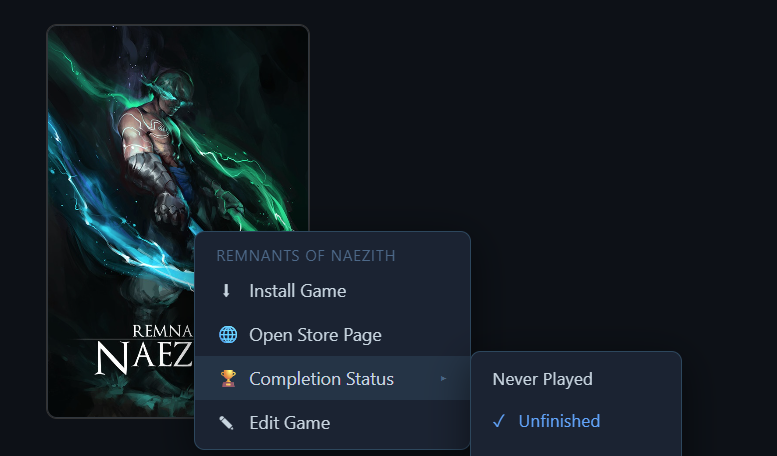
Greetings! The right-click menu needs some positioning tweaks. Trying to open the right-most game (near the edge of the screen) crops the sub-menu (in the first screenshot, I was trying to set Completion Status for The Long Dark but could not see the sub-menu).
Same happens at the bottom of the screen.
Comment has been collapsed.
Good find! You also helped me find another bug with the right click menu (when it's open, right clicking non-right-clickable things would empty the right click menu instead of closing it).
Version 1.4.3 is out now and it fixes both of those right click menu bugs. Also fixed a bug with the "date added" changes in the last update, reorganized the main menu (aka hamburger menu), and made some more changes to Pick 6 weighted mode. When the choosing pool is less than 12 games a warning is presented. And if the pool is less than 6 games, the min/max bounds are loosened incrementally until 6 games are found.
Comment has been collapsed.
Happy to help, and surprised with the speed of the update hahaha great job!
Comment has been collapsed.
Version 1.4.4 is out which finally adds a list/details view for library page, fixed games having date_added = 0 (used to act like 1970-01-01 which resulted in some games incorrectly matching April PAGYWOSG filters, now acts like NULL), fixed a tooltip being cut off, attempted to fix an issue with with updating but can't confirm if it worked. Also disabled gamepad controls due to numerous issues.
Next big move is making support for non-steam library integration plugins. If anybody has ideas of types of other types of plugins I should support, let me know. Also any other suggestions on layouts, new feature requests, bugs, etc.
Comment has been collapsed.
Two integrations I use a lot in Playnite and can't remember if are in Playdate as well are HLTB for filtering/sorting and achivement tracking. I guess HLTB is already integrated since it's a filter on the Pick 6 mode, but I don't think I've seen cheevos. Filtering games with 0 achievements / some achievements / 100% could be fun, as well as having some visual overlay when a game is completed (gold star? gold framing? idk)
Comment has been collapsed.
HLTB filtering and sorting is in place. Sorting compares lowest HLTB number (typically Main) when ascending and highest HLTB number (typically Completionist) when descending.
Achievements are tracked as well, when 100% is detected it auto updates the game's completion status to Completed, you can also set up filters for total and/or unlocked achievements. To see achievement data you can open up a game's edit panel and click stats, but I'm thinking about showing stats by default. I never added sorting by total or unlocked achievements but I could if you or other users want it.
The visual overlay for completion status (and potentially other things?) is still on the to-do list, decided to call them Game Card Badges. Was thinking about showing a colored dot on the image but maybe an outline works better. When I add this, should it be on or off by default?
Comment has been collapsed.
Nice - I would say I glanced over the features rather than deep-diving into them. I still rely mostly on Playnite for day-to-day tracking, although I cannot envision choosing games for PAGY anymore without your tool, since it's so convenient haha
For the visual overlay, I guess I would leave it on as default. Leaving it off risks many people never seeing it, whereas if someone sees the overlay and is bothered they would probably find the setting and turn it off quite easily. At least that's what I imagine. Besides, as a rule of thumb, gamers love seeing their 100% highlighted, so I doubt a lot of people will even turn it off hehehe
Comment has been collapsed.
This is so cool! I've always struggled with picking pagywosg, this is gonna make it so much easier now. :)
I do have a few questions:
- I've synced with BLAEO, and yet there's nothing in my "Won't Play" category, do I need to do something extra to get that to sync?
- Would it be possible to override the completion status on a game with my BLAEO data? Since I do idle for cards, a lot of games are wrongly labeled as "unfinished" whereas they're all correctly labeled on BLAEO.
- There seems to be 2 "Beaten" button in the Filter Quick buttons, one shows Beaten+Completed, the other shows only Beaten, is that intentional? If it is then I think they should have different names. :P
- Would it be possible to scale the UI text? They're quite small for me and hard to see, I'm not sure if it's because I have a 4k monitor or not.
Comment has been collapsed.
- That's a failed BLAEO sync, I need to diagnose this.
- I know what you are asking for because I also left games as unplayed despite having non-zero playtime. Will add an option to toggle automatically upgrading from Never Played to Unfinished when playtime > 0
- Good catch, originally I had a quick filter called "Beaten" but it was unclear that it was for beaten and completed games. I added specific quick filters for Beaten and Completed but I never removed or renamed the original one. Will be fixed in next update.
- Will add a UI Scale slider so users can adjust it to match what they want it to look like
Thank you for the report!
Comment has been collapsed.
I don't use library managers, since after deleting my EGS account I only have Steam to manage, but on Linux you are competing with Lutris which seems to be quite decent IMHO. Have you tried it before jumping to making your own? Not dissing your effort, since it's the Linux way to make your own when the available options don't cover what you need, just curious.
Comment has been collapsed.
Lutris is functional but not visually appealing to me. It also is missing features that I expect as a former Playnite user, and I added new features that are useful for fellow SG users.
We don't just have all libraries in one program. We display all games together, find/hide duplicates, get HLTB data, showcase games in the customizable home page, automatically build complex PAGYWOSG filters, pick random games to play, and more.
Comment has been collapsed.
not visually appealing to me
A lot of great software was made for that one reason :D
Comment has been collapsed.
Version 1.4.5 added customizable outlines for game cards, default colors match BLAEO completion status colors. Added support for PAGYWOSG / POP Secret Santa & Snowball gifts when making PAGYWOSG filters. Added the ability to reorder your platform priority when hiding duplicate games. Plus other fixes and changes.
Version 1.5.0 added a plugin system to support non-Steam libraries. Includes plugins for GOG and Epic Games Store libraries.
Version 1.5.1 fixed an issue with installing version 1.5.0 on Windows
Comment has been collapsed.
installed update and it won't launch. unhandled exception
Traceback (most recent call last):
File "main.py", line 432, in <module>
File "migration.py", line 84, in run
File "migration.py", line 263, in _m5_backfill_fetched_columns
sqlite3.OperationalError: no such column: protondb_fetched
Edit: Just did a clean reinstall to bypass the issue. Side note: I really like the pagywosg filter. Very helpful.
Comment has been collapsed.
Sorry I messed up this update so bad :(
Change log is not long but a lot of stuff changed behind the scenes which unfortunately led to issues. Thank you for reporting this and I am glad you are enjoying the PAGYWOSG filter builder!
I know nobody asked, but what I've been doing is filter = PAGYWOSG, sort by HLTB ascending, group by weighted review percentage. That way the top of the list is short games over 90%
Comment has been collapsed.
Just wanted to follow up that every time I use Playdate and reboot the PC, I have to reinstall from scratch to use it again. It's been this way since April 30th. The error I get trying to launch after rebooting is this:
Traceback (most recent call last):
File "main.py", line 996, in <module>
File "migration.py", line 84, in run
File "migration.py", line 401, in _m9_auto_detect_duplicates
sqlite3.OperationalError: no such column: duplicate_auto
Comment has been collapsed.
Yeah that should not be a problem. Good idea, I'll try to get it done next week. Want me to ping you when it's ready?
Comment has been collapsed.
I gave it a try I can see already it will be a big help for me for game selection for PAGYWOSG, thank you!
Few observations/requests:
- 'Pick a random game' does not work when in List view,
- I sometimes pickup Beaten games for PAGYWOSG so for me it would be great to have these included automatically by the Filter Builder. Ofc I can edit the filter manually so it's not a big deal. It would be sth like:
AND (completion_status = 'Never Played' OR completion_status = 'Unfinished' OR (completion_status = 'Beaten' AND unlocked_achievements < total_achievements))), - I would love to see a filter builder support for other SG events, mainly Cj's Monthly event. That would require tracking which games were in Humble Monthly/Choice.
Comment has been collapsed.
- Good catch, I will fix the dice button in List/Details view
- PAGYWOSG Filter Builder already has completion status toggle buttons at the bottom for easy access. The default is to have only Never Played and Unfinished selected and I think that should remain the case. Maybe I will add a feature to save the recent Completion Status toggles so future use of the Filter Builder will load with Beaten games included for you so you only have to enable it one time, is that a good compromise? (Also games are automatically marked as Completed when unlocked_achievements == total_achievements AND total_achievements > 0)
- That sounds like a useful feature, I'll look into adding support for that. Probably I will include a list of appIDs for all of the qualifying games with a way to automatically update the file every month to include new additions.
Thank you for the report! Feel free to share any other feedback, suggestions, issues, questions, etc.
Comment has been collapsed.
Thank you 🙏
Will it pick up the newly added games automatically every month or will I have to update the app?
Comment has been collapsed.
When you make a filter it grabs the eligible games from the MiaM spreadsheet that's linked in that thread, but I have no idea how quickly that gets updated
Edit: To be clear, you don't need to update PlayDate to get the new games, you just need to create a new filter and the new games will be included
Comment has been collapsed.
I switched from Windows to Linux back in January and the thing I missed the most was Playnite. I decided to use AI to build my own library manager with some extra features that I think some of you will find useful.
https://github.com/RobbyRatpoison/PlayDate/releases/
Library Management
Home Page
Library Page
Pick 6 Page
Tools
Other
I'm still working on adding features, fixing bugs, and overall improvements. Any and all feedback is welcome.
Comment has been collapsed.