Useful?
This is a really great script and I think it will be really useful for my purposes!!
Just one question and correct me if I'm wrong about this, this tool currently displays achievements stats only right? I think it would be even better if we can also see playtimes stats, in specific, average playtime and games with any playtime / with more than x hours, I was checking your code and I believe you already have some works around playtime in computeUserStats so I don't think it would be too hard to add?
Unless the plan with your script is only achievements? Let us know
Thank you!!
Comment has been collapsed.
the all winner summary doesn't show individual play hours but if you click their name it will give the breakdown of all their wins and each individual games stats(win date, achievement counts (X/total)(its also a link to their achievement page for the game for more manual checking), completion %(I assume this is just based off achievement counts), and hours for the game.
just finished a scan myself.
took a while... near an hour but it had to check 806 winners.
Comment has been collapsed.
Yes, completion % is based entire off achievement counts. Games without achievements are excluded from the calculation.
It took you an hour to run? Something is wrong... Mine took only a few minutes with 843 winners.
Comment has been collapsed.
You're welcome :)
The tool displays playtime too, in the rightmost "Hours" column. The multi-user summary shows the commutative time played by each user. The detailed user view shows playtime per game. But it doesn't do any analysis on the playtime. It just displays the raw numbers. If there are any metrics that make sense, I might consider adding them. I don't have access to HLTB data unfortunately.
Another thing I just thought of is to have a flat view of all the games without separation by user. I'll look into it if there's demand.
Comment has been collapsed.
I see where my misunderstanding goes, I am interested in Single User checks currently, so that user specific average playtime and games with any playtime, Multi user checks I don't have an use right now but I can see it's value.
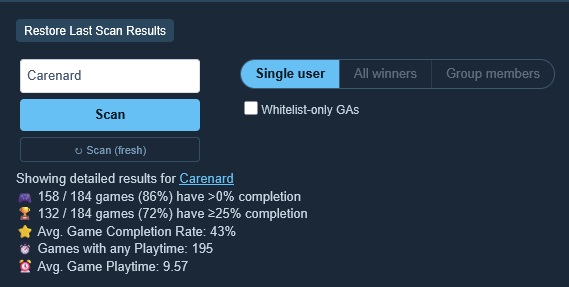
I took the freedom to quickly compute and update your script with what I mean, as you suggested, like in this screenshot. I don't know if this was already a feature? Let me know
Comment has been collapsed.
No it's definitely not a feature and would be a great addition!
Would you like write access to the repo to push your changes? Or you can share them directly with me and I'll update the script.
Comment has been collapsed.
Here are the changes, it's pretty simple, you already did most of the work I only added the calculations, I checked them against Excel formulas and the numbers match so I think they are correct
Inside computeUserStats
// Add these definitions
let anyHours = 0;
let avgHours = 0;

// update the for with this line
for (const w of wins) {
    if (w.hours) anyHours++;
}

// add these values within the return
return {
    anyHours: anyHours,
    avgHours: Math.trunc((totalHours / 60) / anyHours * 100) / 100
}
And in the innerHTML of sgStatus change this at the end
            ⭐ Avg. Game Completion Rate: <b>${stats.compPct}%</b><br>

            ⏱️ Games with any Playtime: <b>${stats.anyHours}</b><br>

⏰ Avg. Game Playtime: <b>${stats.avgHours}</b>Comment has been collapsed.
Can you make the column labels clearer? Not only did I have trouble figuring out which were for wins-with-playtime and which were for wins-with-achievements-earned, but it took me a while to figure out that "Comp %" breaks tradition by not being the total number of wins that have 100% completion, but instead the percentage of achievements earned out of all wins' achievements combined.
Comment has been collapsed.
Good points. It IS confusing. One thing I'll definitely do is rename "Comp %" to "Avg. Achievement %" to match DYEPB nomenclature.
As for the other columns, I'll make it clear that they're based on achievements. One thing I'm considering is combining the Number and % columns. There's no good reason to have both.
So
| Games Won | Games ≥0 | % ≥0 | Games ≥25% | % ≥25 |
|---|---|---|---|---|
| 3 | 2 | 66% | 1 | 33% |
Would become
| Games Won | % /w 1 achievement | % ≥25 complete |
|---|---|---|
| 3 | 66% (2/3) | 33% (1/3) |
Since this makes the table more compact, I can add another column for the actual "completed %"
Adding columns for hours played (>1 hour, >5 hours) is possible, although I never found that level of granularity very useful.
Comment has been collapsed.

Amazing stuff, PoeticKatana! Count me in if you need any assistance on the script <3
Comment has been collapsed.
Bump! and an "ACTION REQUIRED" message to anyone who ran the script before.
⚠️ Attention
Due to a recent bug fix, users who ran scans with versions older than 1.4.1 need to clear all giveaway caches in order for Full CV filtering to work correctly.
To clear the cache, go into settings and click on the button shown here https://ibb.co/HTDqCWBr
Also, be sure to update your script to the latest version (v 1.5.0)
Comment has been collapsed.
Great work PK! I found another little bug/improvement: you should ignore wins that have been marked as Not Received. :)
Comment has been collapsed.
Are you seeing this bug for a multi-copy giveaway? The script should already work for single copy giveaways marked as Not Received.
Can you point me to an example of the bug?
Comment has been collapsed.
The script should already work for single copy giveaways marked as Not Received.
I just tested it on me since I have a not received for Saints Row 2(got it myself sometime later in a collection)... its showing in the list of wins when you run the script on me.
something else I noticed is profile features limited games showing 0hrs played, don't know if there is a workaround for that.
Comment has been collapsed.
Ah right, that's a real mistake. I made it count everything on a user's won page as a win to get around the problem of winners being chopped off in giveaways that have more than 3 winners. I should be able to fix that easily.
I'm still curious what the HTML looks like for multi-copy giveaways with mixed feedback because my script is probably not detecting that correctly.
Comment has been collapsed.
The bug is fixed in the latest release. You'll have to update the script then clear the cache for any pages you're having issues with. (Giveaway Cache [Current Page] under advanced settings).
The new release also saves results and lets you annotate them on a user's won page (like DYEPB?). Only works if you run a full scan on a user (no filtering). Annotation is off by default. You'll have to enable it in settings.

Comment has been collapsed.
Nice! Seems to be working as intended! :)
A minor thing I just noticed, is that if you go to page 2 or any other page of a user's wins, the username isn't filled out automatically unlike on the first page. Recalling the last scan results for that user still works fine though.
Comment has been collapsed.
great job especially since you are not a coder yourself :)
it would be great if there is an option for the gifts sent as well though :)
edit: it seems that the script is a bit bugged. i tried to scan my profile and found some of them has N/A playtime even though i have them.
also, what does the light blue background means?
Comment has been collapsed.
What exactly do you mean by "an option for the gifts sent"? You can run the script on gifts sent or won pages.
Could you tell me which games have playtime incorrectly marked as N/A? I just ran it on your "won" games and I don't see any N/A playtime.
The blue background means that it's a whitelist-only giveaway :)
Edit: See screenshot. Several games have N/A for achievements but playtime looks fine to me.

Comment has been collapsed.
Hmm strange. I ran it at first on gift sent and it didnt do anything. Maybe ill try it again tomorrow.
I cant remember all of them, but i remember quadrata having 0.0 playtime (sorry it wasnt N/A, i mistype) . Iirc lego star wars was also 0.0 ... did it happen intermittently? Strange
Comment has been collapsed.
On the gifts sent page, you have to specify which user you want to check - Either select 'Single user' mode and enter a username or select 'All winners' mode.
You're right. It is reporting 0 hours for a bunch of games that you have hours in. Not sure what's causing that. I suspect it's an issue with the Steam API. Do You Even Play, Bro? reports the same number of games with any playtime (122), but looks like it's excluding some games for the % calculation; it only shows 124 as the total in the denominator vs 133 in my case.

Comment has been collapsed.
Figured it out.
Steam wasn't returning data for Profile Features Limited games. I made the necessary changes. Now it only shows 2 games with 0 playtime and 131 out of 133 as played.
You'll need to update the script and run a new scan using the Scan(fresh) button to grab fresh data.

Comment has been collapsed.
I checked. I can determine if an app is a dlc through the Steam store API, but that endpoint is apparently rate-limited to 200 requests per 5 minutes so won't work for bulk requests. The ESGST API also provides the data, but I don't want users to start flooding Rafael's server with 100s of requests and drive up his costs.
So, not sure. Maybe someone else with more knowledge can answer.
Comment has been collapsed.
Actually, thinking about it, using ESGST to check if an app is a DLC isn't much different than using ESGST to check if a game is Full CV which I'm already doing. With caching, the burden on ESGST should be minimal. So yeah, I think it's doable. I'll work on it.
Too tired right now. Might get around to it later in the week.
Comment has been collapsed.
Interesting script! The stats I found for the games I've given away are not what I expected at all. But there's something heartwarming about the cheap or "mediocre games" getting more love than the "good games" (based on the combo of playtime + achievements hit).
(there is significantly LESS card farming than I expected lmao - c'mon folks, the booster pack economy needs support!!!)
Comment has been collapsed.
Hey PK,
I've been using your script for a few days now and I don't have much to complain about.
However, I did find a bug that I solved by clearing the cache.
It wouldn't let me scan a user, giving me a “No matching found” error, or it would only return a DLC depending on whether the option was checked or not.
The other users still worked, and this one worked after clearing the various caches.
Anyway, It's great, well done, congratulations ;)
Comment has been collapsed.
Thanks for using and appreciating the script!
I suspect the bug you ran into was because the cache for that user had an older format than the current one. I updated the cache structure a couple of times during development to support new features. If you run into the same problem again, then it's definitely a bug which I'll need to look into, so please ping me if it happens again.
Comment has been collapsed.
Got it. I will come back to you if i see this again ;)
Comment has been collapsed.
Woah, this looks interesting. I'll take the time to try it out for sure. Thank you for your efforts!!
Comment has been collapsed.
Got this message: Scan failed — see console ???
same for all users, i try to clear all caches, change nothing
how can i check console?
Comment has been collapsed.
Which version of the script are you using? I pushed a small update earlier today - Went from version 1.7.1 which was stable for a while to 1.7.3 . Maybe I broke something.
You open the developer console In Firefox/Chrome with F12. In Opera it's Ctrl + Shift + I.
Go to the console tab and look for any error, warning or log messages.
Comment has been collapsed.
For the achievement percentages, it seems to be counting two more games for me than Do You Even Play Bro. Maybe it's still counting the Not Received wins?
Also the layout breaks in the newest version when used with DYEPB:

Comment has been collapsed.
You only have 1 Not Recieved win (Spline) and it's not being counted by Playstats so that's not the issue.
I think the problem is with DYEPB. If you look at Games with Playtime... in its summary, it shows that you have 196 total wins which is inaccurate (you have 198 according to SG). It's hard for me to figure out which games DYWPB missed without digging into their script. My guess is that it is failing to translate some sub wins into apps.
As for the layout, the only change I made in this version was to turn annotations on by default. If that bothers you, you can turn them back off in settings ('Annotate Results'). Maybe I should make it off by default again...
Yes, it collides with DYEPB's rows, but I don't know what to do about that. Personally, I've disabled DYEPB.
Some ideas:
- I can add an option to move the Playstats summary into the second column if you think that looks better.
- If you prefer the DYWPB style summary, I can add an option to make Playstats' summary look identical to that.
- I can add an option for Playstats to hide DYEPB's summary.
- I can add a switch on the user wins page to toggle between the Playstats and DYEPB summaries. Seems pointless because it's essentially the same data.
Let me know what you think.
Comment has been collapsed.
You might be right, on another PC DYEPB is showing I have 197 wins so there's definitely something funky there.
As for the visual issue: it would be perfect if the black/grey background could be extended further down. But I understand if you don't want to put your time into fixing a compatibility problem of two plugins with overlapping functionality.
And I prefer the way you've laid out the summary vs DYEPB. ;)
Comment has been collapsed.
Ah, I think I see what you mean by "layout breaks". Do you mean the overlap between the tan byepb toolbar and the table above it? For me it looks normal - there's no overlap and the byepb toolbar has the same black/grey background as the table. Seems like a problem with the style you're using.
Edit Nevermind. I see exactly what you're talking about. The dark theme I was using was masking the issue. I'll see if I can do something about it.
And I prefer the way you've laid out the summary vs DYEPB. ;)
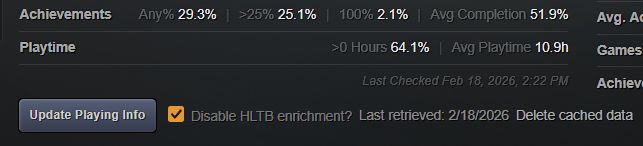
I tried to make it more compact and clean that DYEPB (all the info in two rows). Only thing I wasn't sure about is whether to display the detailed data e.g. 48/191 or not. In the end, I chose to make it visible as a tooltip.
Comment has been collapsed.
is there a way to disallow the playstats button from being saved offscreen?
a few times now I have had to delete some data from browser storage because the playstats button somehow got saved to starting in a negative location(out of screen)(guess a solution would be have it check for it and if its in a negative location reset position to starting default)... guessing I tend to drag it around to much
Comment has been collapsed.
Hmm.. never had that issue. I have mine placed in the top bar and I almost never move it. I'll have to look into how to prevent it from going offscreen.
Maybe a better option is to make the button position fixed when its minimized and only make the panel draggable when it's expanded. That way, the button will always be there when you reload a page.

Comment has been collapsed.
feel like its me dragging it when its expanded(or expanding after dragging) that is causing the issue.
last one I was unable to shrink the window, refreshed and it was offscreen.
Comment has been collapsed.
I added logic to clamp the panel's position when it's dragged, expanded or when the window is reloaded.
Try version 1.7.5 and let me know if you have the same issue again.
Comment has been collapsed.
Hi again :D
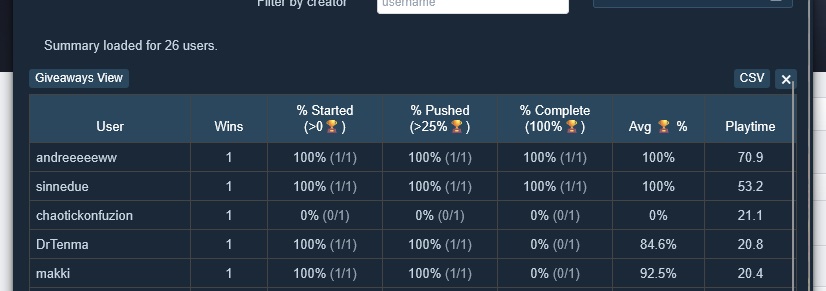
Want to bump and maybe give a small suggestion, I have value for group scan now, I would personally like to see an overall stats of each category, example on top of % Started, the % of those, with the 5 entries I'm including in the ss that would be 80% for example.
80% first column
80% second column
40% third column
75.4% fourth column
37.28 fifth column
Dunno if you think that's valuable or not or if it's already somewhere else and I'm missing, but I think it can give like an estimate of how healthy a group is playrate wise. If you feel like is not worth it or don't have time no issue I can fork the project and do a small adjustment for myself ^^
Comment has been collapsed.
Showing the averages of all the stats for multiple users would definitely be useful. I'll add that to the script when I get a chance.
Thanks for the great suggestion.
Comment has been collapsed.
I'm almost done with the changes but have a question.
How would you like the average playtime in the fifth column to be calculated? Do you want to base it on the number of users or the number of games? Do you want to include users/games with 0 playtime in the average?
Here's an example:
User A : 2 wins, played 2 for a total of 30 hours
User B : 2 wins, played 1 for a total of 10 hours
User C : 1 win, 0 hours
There are 4 ways to calculate the average:
40/2 (eligible users) = 20h
40/3 (eligible wins) = 13.3h
40/3 (total users) = 13.3h
40/5 (total wins) = 8h
Option 2 makes the most sense to me. Let me know if you agree. If you'd like two values to be shown, I can do that as well.

Comment has been collapsed.
Hey PK
I didn't remember the user and I accidentally closed that stupid window :(
But I found someone who had played a game (achievement unlocked), and your script didn't detect it. It was the first time I scanned that user, so it's not a cache issue.
The game was a freebie that had been removed from Steam, could that be the problem?
edit: Found the user. I scan again and see my mistake. All my bad. No bug so just a bump <3
Comment has been collapsed.
Version 1.9.4 released: Added an option to filter results based on Steam review scores and review counts.
This could be useful to see if someone else has played their high quality wins or to run on your own profile to discover good games that you haven't played yet and might have forgotten about.

Comment has been collapsed.
I was curious how easy it is to add a "% Played(>50%🏆)" and a "% Played(>75%🏆)" to the table? i think that will give a better view of how much each user plays a game
Comment has been collapsed.
Pretty easy, but I'm a little reluctant to add it.
I feel that the "Average completion %" already gives an idea of how much a user plays their games. Is the the >50% or >75% data really that useful? For me at least, it doesn't add a lot of new insight and is something I would probably ignore. I already don't pay much attention to the 100% completion figure.
But I'm curious what others think: Do you want >50% and >75% completion data to be displayed? If so, I'll add it, but I'm inclined to make it an optional thing, controllable via a setting. I'd like to keep the default reports/results as clean as possible. Having 6 columns in the table related to achievements might be too much visual clutter.
Comment has been collapsed.
I feel like > 75% is useless data, a large of chunk of games that get past that % will be those going for 100%... especially with how many games can get beaten and not hit 25% of the achievements.
50% is a little bit more useful but has the same issue at 75%, just to many games can be beaten without hitting the 50% mark(and with them doing side content).
Comment has been collapsed.
Like you say, that's a lot of clutter in a numbers heavy table. Plus, like Carenard said, there are plenty of games that can be beaten with <50% of the achievements. I'd put it as an optional toggle.
Comment has been collapsed.
I released a new version with the option to display those values. You'll need to flip "Show Extended Achievement Stats" to ON in the settings. Let me know if anything looks wrong.
Comment has been collapsed.
Hi! Would there be a way to differentiate between games that a user has privated vs games that appear as missing because they have been deleted from the Steam store and no longer match an app id?
It would be nice to separate these cases where a deleted-from-Steam game is not showing up versus someone actually privating a game that should be on their profile. I see we have the toggle to exclude all missing games from the calculations, but I'd like to include any games that have been privated (app id exists in the store but game is not found on profile), while excluding the games that have been deleted from Steam and will never be shown as played regardless of whether someone actually did play them or not.
I'm not sure how feasible that is without maintaining a false positive whitelist like SGTools does so completely understand if it can't be done, just figured I'd ask in case it was possible. Thanks!
Comment has been collapsed.
Finding out if a game has been removed from the Store is actually fairly easy. The ESGST API has that info in most cases. The problem is that games without a store page aren't necessarily banned or revoked and can still exist in a user's library.
So yes, I would have to maintain a list of all banned, revoked or otherwise problematic games like SGTools does which is not easy. There's no single exhaustive source for this information. I found a partial list of banned games here https://steam.madjoki.com/apps/banned. Of the 6 games reported as missing from your account, it only lists 3: Quadrant M4, Spaceguy 2 & Secret Agent 001. So, it doesn't solve the problem entirely.
I'm leaning towards using your suggestion as a heuristic: Include missing games that have store pages. Exclude missing games w/o store pages (assume they've been removed from user's account). That opens the possibility for people to 'cheat' by privating games that have no Store pages, but practically speaking, that's a tiny fraction of anyone's wins and shouldn't matter in the grand scheme of things.
Comment has been collapsed.
I like that idea. Using me as an example all 6 actually are on my account - never privated and fully visible in my library but they still show as missing on the script. I even have achievements on 3/6 but I think that data can't be retrieved because Steam has gone out of its way to hide these even on player profiles. Weirdly Blaeo can retrieve them and the achievements but I have no idea how they managed it. Possibly something was changed after it pulled the data that now makes it impossible to retrieve though. It seems like as long as the store page is accessible even if the game has been delisted (Beyond Eyes is a good example also on my account) stats are retrieved as expected unless the user has privated it though.
Comment has been collapsed.
Well, this is slightly embarrassing. Turns out that the Steam API returns achievements data even for games that are missing or privated in a user's library, so there's no need at all to detect or exclude missing games. I was operating under a false assumption. I reverted the code to the way it was before. Ooops :)
Comment has been collapsed.
Nice! That's good news, thanks for looking into it :)
Comment has been collapsed.
I was wrong... again 😳 Achievements for privated games are NOT visible. The good news is that achievements ARE visible for any games that are missing from your library for any other reason. e.g. banned.
So, I added back the private game check, but instead of doing it by looking at game ownership, I now determine privacy by querying each game's achievements and only flag games that return an explicit error message. This is simpler and more robust than before and should avoid any false positives.
New version released 1.11.3
Comment has been collapsed.
seems stuff tagged in the API as music isn't being ignored in scans with the ignore DLC option enabled.
Comment has been collapsed.
Can you share an example? I'll see if there's a way to detect it as a DLC.
Comment has been collapsed.
I don't know if there's an easy and safe way to detect stuff tagged as music. I'm trying to avoid hitting the Steam store API because it has a strict rate limit. I could auto exclude any apps that end with the words SOUNDTRACK or OST, but that seems very risky.
Might have to live with this one since it only affects your games with any playtime stat.
Comment has been collapsed.
Awesome tool!
Few requests:
- When opening Playstats window on a user that you have a previous scan for, automatically load the previous scan without having to click Restore Last Scan Results
- When restoring Last Scan Results, show the chart and Detailed results restored from cache
- Show a cumulative Total Playtime across all games somewhere. Maybe when hovering over "Avg Playtime 4.8h" it would show the Total Playtime
Comment has been collapsed.
Restore Last Scan Results restores the results of the last scan done on any page, not necessarily the current one. So if you scan user A, go to user B's page and click the button, you'll get the results of User A! It's meant as a quick way to restore the table if you close it accidentally or reload the page. I know that's unintuitive and bad design. I'll look into adding caching of the full results on a per page basis. It'll cost a bit of storage (AI estimated 380kB per 1000 giveaways). I guess that's nothing in this day and age. I'll have to add replacement or pruning logic to keep the cache size bounded.
Your other two request should be easy to implement.
I'll look into it when I have the time (and energy).
Comment has been collapsed.
You can skip the auto restore. Or just have it auto restore in the intuitive case where I visit someone's won page and open Playstats. If the button would do something there, do it automatically.
Comment has been collapsed.
I've made the changes you requested. It now saves the results if you run a full scan (no filters applied) on a user's wins and shows them automatically if you open Playstats on that user's page.
I also added Total Playtime as a tooltip if you hover over "Avg Playtime ..." and in the user summary panel.
Comment has been collapsed.
Hi everyone!
I’ve put together a userscript that reports play stats (hours and achievements) for SteamGifts winners.
You might be thinking, "Wait, doesn't Do You Even Play, Bro? already do this?" Not quite! While DYEPB focuses on a user's overall win play percentages, SG Playstats also works on 'gifts sent' and group pages which helps you answer questions like: "Are the people I gave games to actually playing them?" or "Which members of this group are playing their wins?"
You might also be wondering, "Does this script replace or supersede DYEPB?" My answer is: No. DYEPB is simple, time-tested and does what it does really well.
More importantly, it annotates its results on a user's page which my script doesn't do.How to Install
How to Run
The script grabs giveaway info from the page and pulls play data from Steam to create a sortable results table:
⚠️ Chrome users are reporting slow run times compared to Firefox. If the Steam stage of a 300 giveaway scan is taking closer to 30s than 10s, I recommend changing the Steam Scan Speed setting from 6 to 10. Firefox users should stick to the default value.
Scanning Options
Caching
The script stores data locally (cache) to be nice to SG and Steam by reducing the number of data requests.
When you run a scan, you have a choice:
Note 1: The SG giveaway cache holds 50,000 items, and Steam cached data expires after 5 days. Both can be adjusted in settings.
Note 2: There are advanced debug options in settings that let you view / delete cache contents if you're so inclined. 99% of you should have no reason to.
Limitations
Disclaimers
Steam limits Steam has a daily API quota. If you run massive scans constantly, they may temporarily block your API key.
I’m NOT a dev! My knowledge of programming is very basic. I built this with a ton of help from AI. If you’re an actual coder and want to improve the script, please feel free!
Changelog
Comment has been collapsed.